
How We Recovered a Website’s Organic Traffic After a Technical SEO Failure
See how a technical SEO audit helped a business identify indexing, redirect, and content issues after a sudden organic traffic drop—and rebuild search visibility.
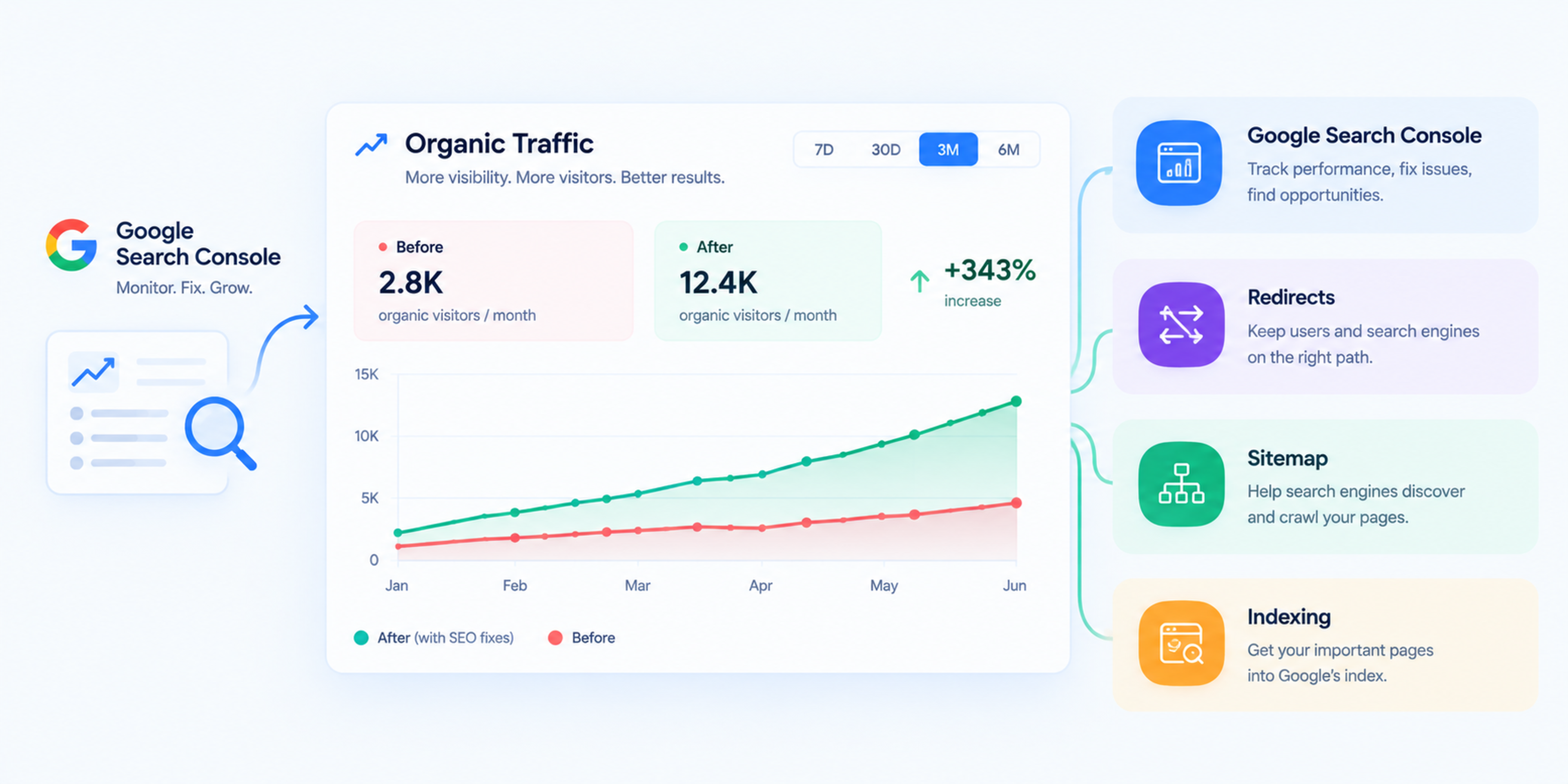
How We Recovered a Website’s Organic Traffic After a Technical SEO Failure
A business contacted us after its organic traffic dropped sharply over several weeks. The website had not lost all rankings, but important service pages had disappeared from Google, enquiries had slowed down, and the team could not identify what had changed.
The problem was not a lack of content. The website had useful service pages, blog articles, and a clear business offering. The issue was technical: search engines could no longer crawl, understand, and index parts of the site properly.
This case study explains how we diagnosed the traffic loss, fixed the technical SEO issues, and helped the website regain visibility.
The client
The client was a service business with a website that had previously generated consistent organic enquiries. Their main traffic came from Google searches related to their services, location, and industry questions.
After a website update, organic sessions began to fall. At first, the team assumed it was seasonal. But when the decline continued and key pages stopped appearing in search results, they realised something more serious had happened.
The challenge
When we started the audit, the website showed several warning signs:
Important service pages were not appearing in Google Search Console as indexed.
Some URLs were returning redirect chains.
A number of pages had inconsistent canonical tags.
The XML sitemap included old and redirected URLs.
Several internal links still pointed to outdated addresses.
Some pages had thin or duplicated content after the website update.
Core Web Vitals had worsened on mobile.
The traffic drop appeared to be caused by a combination of indexing problems, poor redirect handling, and weakened page-level relevance after the site changes.
Our SEO audit process
We began with a full technical SEO audit rather than making assumptions based only on the traffic graph.
1. Reviewed Google Search Console
We checked the Pages report, indexing status, sitemap submissions, crawl errors, and manual actions. This helped us identify which URLs Google could see, which pages were excluded, and why.
We also reviewed query data to understand whether the traffic loss came from branded searches, service keywords, blog content, or local searches.
2. Crawled the full website
We crawled the website to find broken links, redirect chains, duplicate pages, missing metadata, orphan pages, and incorrect canonical tags.
This step revealed that several important service URLs were being redirected through multiple steps before reaching their final destination.
3. Checked indexability
We reviewed meta robots tags, X-Robots-Tag headers, canonical tags, sitemap entries, and internal linking. Some pages were technically accessible but were sending mixed signals to Google.
For example, a page was indexable in its source code, but its canonical tag pointed to another URL. This created uncertainty about which version Google should index.
4. Reviewed website migration changes
The client had recently updated parts of the website. We compared old URLs with new URLs and checked whether redirects were correctly implemented.
We found that some old service pages had been removed without proper 301 redirects. Others redirected to the homepage instead of the most relevant replacement page.
5. Assessed content quality
We reviewed the main service pages and blog articles to check whether they still matched search intent. Some pages had been shortened during the redesign, removing useful explanations, FAQs, and supporting details.
This did not mean the content had to be rewritten from scratch. In many cases, it needed to be restored, expanded, and better structured.
Issues we found
The main technical and content issues were:
Important pages excluded from Google’s index
Incorrect canonical tags on key service pages
Redirect chains created during the website update
Old URLs redirecting to irrelevant pages
Outdated URLs still listed in the XML sitemap
Broken internal links from blog articles and navigation
Orphaned service pages with few internal links
Thin content on pages that previously ranked well
Missing FAQ and supporting content on key service pages
Mobile performance issues affecting user experience
Fixes we implemented
1. Cleaned up the XML sitemap
We removed redirected, broken, noindexed, and duplicate URLs from the sitemap. Then we submitted a clean sitemap containing only canonical, indexable pages.
This helped Google focus on the pages that mattered.
2. Fixed redirect chains
We mapped old URLs to their most relevant new destinations and implemented direct 301 redirects.
Instead of sending users and crawlers through multiple redirects, each old URL pointed directly to the final live page.
3. Corrected canonical tags
We reviewed canonical tags across the website and ensured that every important page used a self-referencing canonical URL.
For pages with genuine duplicate versions, we selected one preferred version and pointed the other versions to it.
4. Restored internal links
We updated internal links from blog posts, service pages, navigation, and footer areas so they pointed directly to live URLs.
We also added contextual internal links between related pages. For example, service pages linked to relevant case studies, FAQs, and supporting guides.
5. Recovered orphan pages
We identified important pages that had no internal links pointing to them. These pages were added to relevant service sections, blog articles, and resource areas.
This made it easier for both users and search engines to discover them.
6. Improved thin service pages
We expanded key service pages with clearer explanations, process details, FAQs, and related services. The goal was not to add words for the sake of it, but to make each page more useful for someone comparing providers.
We also added descriptive headings, concise introductions, and clear calls to action.
7. Added structured data
We implemented relevant structured data, including Organization, Service, BreadcrumbList, and FAQPage where appropriate.
This helped search engines understand the business, its services, page hierarchy, and common customer questions.
8. Improved mobile performance
We optimised images, reduced render-blocking resources, and improved mobile page stability. These changes supported a better page experience and made the website easier to use on phones.
The results
Recovery did not happen overnight. Search engines needed time to recrawl the website, process the corrected signals, and reassess the affected pages.
However, the improvements became visible in stages:
More important pages began appearing as indexed in Google Search Console.
Redirect chains and crawl errors decreased.
Service pages started returning for their target search terms.
Organic sessions gradually recovered.
Enquiries from organic search improved.
The team gained a clearer understanding of which pages needed ongoing content updates.
The biggest win was stability. Instead of relying on a website that search engines could only partly understand, the client now had a cleaner technical foundation for future content and SEO growth.
Key takeaways
A sudden organic traffic drop is often caused by more than one issue. In this case, indexing problems, redirect mistakes, canonical confusion, and weakened content all contributed.
If your website traffic has dropped, check these areas first:
Google Search Console indexing reports
XML sitemap accuracy
Redirect chains and broken links
Canonical tag correctness
Internal linking
Content changes made during a redesign
Mobile performance and Core Web Vitals
Structured data validity
Fixing technical SEO does not guarantee instant rankings, but it removes the barriers that prevent good content from being found.
Related services
If your website has experienced a traffic drop, these services may help:
Related reading
For a deeper understanding of the topics covered in this case study, read:
How Global IT Services can help
Global IT Services provides technical SEO audits, organic traffic recovery support, website migration SEO, and Next.js development for businesses that need reliable search visibility.
If your website traffic has dropped after a redesign, migration, or platform change, a structured technical SEO audit is the best place to start.
Frequently Asked Questions
Why did my website’s organic traffic suddenly drop?
A sudden traffic drop can happen because of indexing problems, incorrect redirects, canonical tag issues, a website migration, technical errors, content changes, algorithm updates, or a loss of internal links. Google Search Console is usually the best first place to investigate.
How long does it take to recover organic traffic?
It depends on the cause. Technical fixes such as indexing and redirect corrections can start showing improvement within a few weeks, but full recovery can take longer because search engines need time to recrawl and reassess pages.
Can a website redesign cause SEO traffic loss?
Yes. A redesign can cause traffic loss if URLs change without proper redirects, important content is removed, canonical tags are incorrect, internal links break, or pages become difficult for Google to index.
What is the first step to recover lost organic traffic?
Start with Google Search Console. Check which pages are indexed, review indexing exclusions, inspect affected URLs, and compare traffic changes before and after the drop. Then run a technical SEO audit to identify redirect, canonical, sitemap, and internal-link issues.
Do I need new content to recover traffic?
Not always. Some websites recover after fixing technical issues alone. However, if pages have become thin, outdated, or less relevant than competitors, improving content quality, structure, FAQs, and internal linking is often necessary.
Technical SEO & Global Growth Marketing
Data-driven search engine dominance that drives inbound revenue and organic clients.
Explore this service
Feedback & Discussion
Have questions or insights? Share your thoughts below.