
How a Restaurant Ordering System Improved Online Sales and Delivery Management
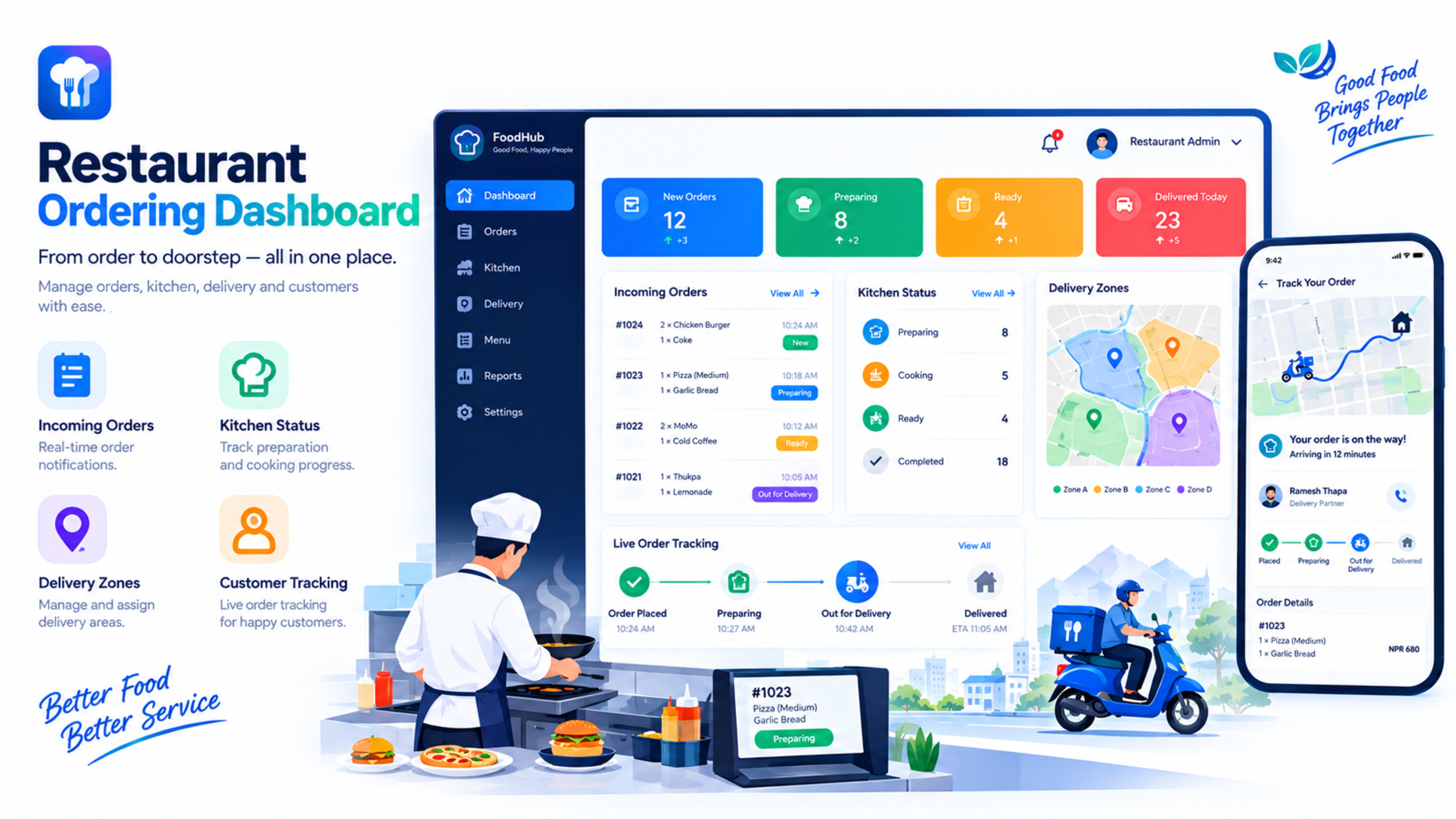
How a Restaurant Ordering System Improved Online Sales and Delivery Management
A restaurant was receiving online orders through phone calls, social-media messages, and third-party delivery platforms. As demand grew, the team struggled to track orders, update menu availability, manage delivery areas, and avoid missed or duplicated orders.
We built a custom restaurant ordering system that brought online orders, menu management, kitchen updates, and delivery coordination into one place. The result was a smoother ordering experience for customers and a more organized workflow for staff.
The client
The client was a growing restaurant serving both dine-in customers and online delivery orders. The business received enquiries through its website, Facebook page, Instagram messages, phone calls, and third-party delivery apps.
The team could prepare food well, but order management was becoming difficult during busy hours. Staff often had to check multiple platforms, confirm orders manually, and update availability by sending messages to customers.
The challenge
Before the new system, the restaurant faced several operational problems:
Orders arrived through different channels, making them easy to miss.
Staff manually confirmed each order through phone or social media.
Menu items were sometimes unavailable, but the online menu was not updated.
Delivery areas and charges were managed manually.
Kitchen staff did not have a clear view of incoming orders.
Customers often called to ask about order status.
Busy periods caused delays, duplicated orders, and confusion.
The restaurant had limited visibility into best-selling items and peak hours.
The main issue was not a lack of demand. It was the lack of a central system to manage demand efficiently.
Our approach
We started by mapping the restaurant’s real workflow rather than forcing the team to change everything immediately.
The existing process was:
Customer places an order
Staff confirms the order manually
Kitchen prepares the food
Staff updates the customer
Delivery is arranged
Payment is collected
Order is marked complete
We identified where delays and mistakes happened, then designed a system around those steps.
The solution
We developed a custom restaurant ordering system with separate views for customers, kitchen staff, delivery staff, and restaurant administrators.
Online menu and ordering
Customers could browse the menu, view item descriptions, select quantities, add special instructions, and place orders directly from the website.
The menu was organized into categories such as:
Starters
Main courses
Rice and noodles
Momo and dumplings
Drinks
Desserts
Combos and offers
Each item included a name, description, price, image, availability status, and optional add-ons.
Real-time order management
When a customer placed an order, it appeared instantly in the restaurant dashboard. Staff could see:
Customer name and contact number
Ordered items
Special instructions
Order type: delivery, pickup, or dine-in
Payment status
Delivery address
Order time
Order status
This reduced the need for staff to manually copy orders from messages or phone calls.
Kitchen display system
Kitchen staff received incoming orders through a simple kitchen display view. Orders could be marked as:
New
Preparing
Ready
Handed over for delivery
Completed
This helped kitchen staff priorities orders during busy periods and reduced confusion between front-of-house and kitchen teams.
Delivery zone management
The system allowed the restaurant to define delivery areas and charges based on location.
For example:
Free delivery within a nearby radius
Fixed delivery charge for nearby areas
Higher delivery charge for outer areas
Restricted delivery for locations outside the service zone
Customers could enter their delivery address and see whether delivery was available before completing checkout.
Order status updates
Customers could see their order status without calling the restaurant.
Status options included:
Order received
Being prepared
Ready for pickup
Out for delivery
Delivered
This reduced repeated phone calls asking, “Where is my order?”
Menu availability control
If an item was sold out, staff could mark it unavailable immediately. The item could then be hidden from the customer-facing menu or shown as sold out.
This prevented customers from ordering items the kitchen could not prepare.
Admin reporting
The restaurant owner and manager could view reports such as:
Total orders
Revenue by day, week, or month
Best-selling items
Peak ordering hours
Delivery versus pickup orders
Average order value
Cancelled orders
Popular menu categories
These reports helped the restaurant make better decisions about staffing, stock, promotions, and menu planning.
Technology used
We built the system using a modern, scalable web stack designed for speed and reliability.
Next.js for the customer-facing ordering website and admin dashboard
Secure database architecture for menus, orders, customers, and delivery zones
Role-based access for admins, kitchen staff, and delivery staff
Responsive design for mobile, tablet, and desktop ordering
API-based architecture for future integrations with payment gateways or delivery services
The goal was to keep the customer ordering flow simple while giving restaurant staff enough control to manage daily operations.
The results
After implementation, the restaurant had one central system for managing online orders and delivery operations.
Key improvements included:
Fewer missed orders during busy hours
Faster order confirmation
Clear kitchen workflow
Better coordination between front desk, kitchen, and delivery staff
Fewer customer calls asking for order updates
More accurate menu availability
Better visibility into popular items and peak hours
Improved customer experience during delivery and pickup
The biggest improvement was operational clarity. Staff no longer had to manage orders across multiple chats, phone calls, and handwritten notes.
Lessons learned
A restaurant ordering system is not only an online menu. It is an operational tool that connects customers, kitchen staff, delivery staff, and management.
Before building a food-ordering system, a restaurant should define:
Delivery areas and charges
Order types
Kitchen workflow
Menu update process
Payment methods
Peak-hour staffing
Customer communication process
Reporting requirements
Answering these questions early makes the system far more useful after launch.
Features every restaurant ordering system should have
If you are planning a restaurant ordering system, look for these features:
Mobile-friendly online menu
Clear product images and descriptions
Add-ons and customization options
Delivery, pickup, and dine-in options
Delivery-zone management
Real-time order dashboard
Kitchen display system
Order-status updates
Menu availability control
Discount coupons and offers
Customer order history
Sales and product reports
Secure payment integration
Admin role management
Common mistakes restaurants make
Avoid these mistakes when launching online ordering:
Using social-media messages as the main order system
Not updating menu availability during busy hours
Offering delivery to areas the kitchen cannot serve efficiently
Making checkout too complicated
Not giving kitchen staff a clear order queue
Ignoring mobile users
Failing to track best-selling items
Not planning for peak-hour demand
Having no clear process for cancelled or delayed orders
How Global IT Services can help
Global IT Services builds restaurant ordering systems, food-delivery platforms, ecommerce websites, custom dashboards, and business automation tools for restaurants, cafés, cloud kitchens, and food brands.
If your restaurant is managing orders through phone calls and social-media messages, a custom ordering system can help reduce manual work and improve customer experience.
Frequently Asked Questions
What is a restaurant ordering system?
A restaurant ordering system is a digital platform that allows customers to browse a menu, place orders, and pay online. It also helps restaurant staff manage kitchen preparation, delivery, pickups, and order status.
How does an online food ordering system work?
A customer selects items from the menu, adds them to the cart, chooses delivery or pickup, provides delivery details if needed, and completes checkout. The order then appears in the restaurant dashboard or kitchen display system.
Can a restaurant ordering system manage delivery areas?
Yes. A good system can define delivery zones, delivery charges, minimum order values, and restricted areas. Customers can see whether delivery is available before placing an order.
Can customers track their food order?
Yes. Customers can see order statuses such as “Order received,” “Being prepared,” “Out for delivery,” and “Delivered.” This reduces phone calls asking for updates.
Can the system show sold-out items?
Yes. Staff can mark items as unavailable or sold out. The system can hide those items from the customer-facing menu or display them as unavailable.
How much does a restaurant ordering system cost?
The cost depends on features, design, payment integration, delivery management, and whether the restaurant needs a website, mobile app, or full custom platform. A basic ordering website costs less than a complete delivery-management system.
Can the system connect with delivery services?
Yes. Depending on the platform and provider, a restaurant ordering system can be integrated with third-party delivery services or built with its own delivery-management workflow.
Feedback & Discussion
Have questions or insights? Share your thoughts below.