
How a Custom CRM Dashboard Helped a Sales Team Track Leads Faster
See how a custom CRM dashboard helped a growing sales team reduce missed follow-ups, track every lead in one place, and respond to enquiries faster.
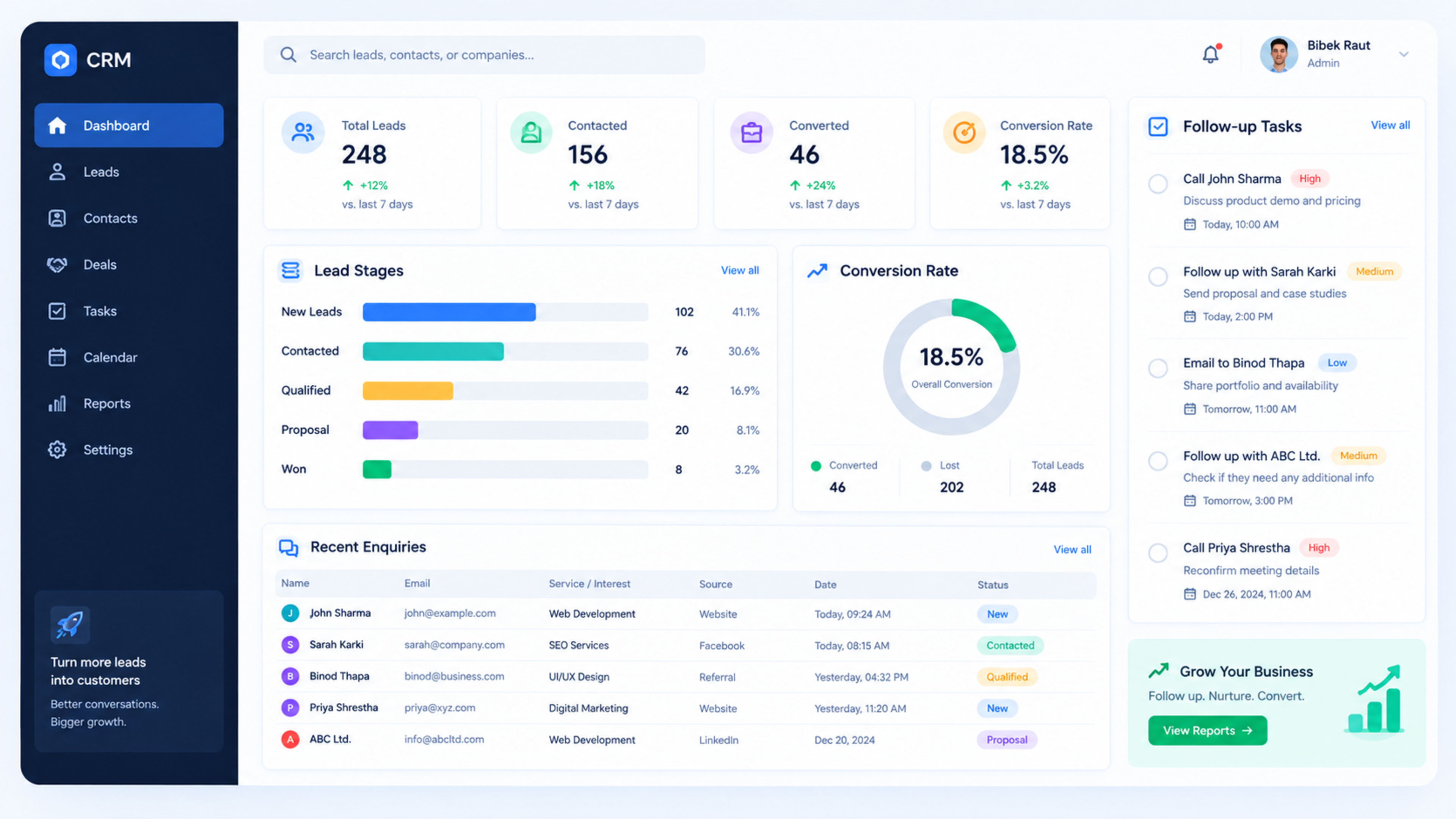
How a Custom CRM Dashboard Helped a Sales Team Track Leads Faster
A growing service business was losing track of leads because enquiries were spread across email, WhatsApp, spreadsheets, and a basic contact form. The sales team could see new leads, but they had no clear way to know who had followed up, which leads were hot, or which enquiries had been forgotten.
We built a custom CRM dashboard that brought every enquiry into one place, showed the sales pipeline clearly, and made follow-ups easier to manage. The result was fewer missed leads, faster response times, and a much clearer view of sales performance.
The client
The client was a service-based business receiving enquiries from its website, phone calls, email, and social media. The team had grown, but its lead-management process had not grown with it.
They were not looking for a complicated enterprise CRM. They needed something simple enough for the sales team to use daily, but powerful enough to show exactly where every lead stood.
The challenge
Before the new dashboard, the team managed leads using a combination of spreadsheets and inbox searches. This created several problems:
New enquiries were sometimes missed during busy periods.
Team members were unsure who owned each lead.
Follow-ups depended on memory or manual notes.
Managers could not easily see the sales pipeline.
Reporting took too long because data was scattered.
It was difficult to identify which marketing source brought the best leads.
The biggest issue was not a lack of leads. It was the lack of a single, reliable system to manage them.
Our approach
We started by understanding how the sales team actually worked. Instead of forcing them to change their entire process, we mapped their existing workflow and identified the steps that caused delays.
The main stages were:
New enquiry received
Lead assigned to a salesperson
First contact made
Requirement discussed
Quote or proposal sent
Follow-up required
Lead won or lost
We then designed a custom CRM dashboard around these stages.
The solution
We developed a custom CRM dashboard with a clean, practical interface designed for daily use by the sales team.
Central lead inbox
Every website enquiry, manual lead entry, and imported lead appeared in one central dashboard. Each lead included the customer’s name, contact details, service interest, source, assigned owner, status, and follow-up history.
This removed the need to search through email threads or spreadsheets to understand a lead’s history.
Clear sales pipeline
The dashboard displayed leads in a simple pipeline view. Sales staff could instantly see whether a lead was new, contacted, in discussion, awaiting a quote, or closed.
This made it easier to prioritise follow-ups and identify leads that had been inactive for too long.
Lead assignment
When a new enquiry arrived, it could be assigned to a specific team member. The assigned person received a notification, so responsibility was clear from the beginning.
This reduced confusion around “Who is handling this lead?”
Follow-up reminders
The system allowed sales staff to set follow-up dates and tasks. Overdue follow-ups were highlighted on the dashboard, making it easier to see which leads needed attention.
Lead source tracking
Every lead could be tagged by source, such as website form, Google Ads, referral, social media, phone call, or email.
This helped the business understand which channels were bringing in the most valuable enquiries.
Sales reporting
Managers could view key metrics without exporting data or building spreadsheets:
Total new leads
Leads by source
Leads by service
Conversion rate
Average response time
Follow-ups completed
Won and lost leads
Sales performance by team member
Technology used
We built the dashboard using a modern, scalable web stack designed for speed and ease of use.
Next.js for the dashboard interface and fast user experience
Secure database architecture for lead and customer data
Role-based access so sales staff, managers, and admins saw the right information
API integrations for website forms and communication tools
Responsive design so the team could use it on desktop and mobile
The focus was not on adding unnecessary features. It was on making the sales team’s daily workflow faster and clearer.
The results
After implementation, the sales team had one place to manage every lead. The improvement was immediate in day-to-day use.
Key outcomes included:
Faster assignment of new enquiries
Fewer leads left without follow-up
Better visibility of the full sales pipeline
Clearer ownership of every lead
Easier identification of the best lead sources
Less time spent searching through spreadsheets and inboxes
More reliable sales reporting for management
The most important change was behavioural: the team stopped relying on memory and manual notes. The dashboard became the default place to check lead status and plan follow-ups.
What made the project successful
The success came from keeping the system simple and aligned with how the team already worked.
We focused on:
A clean interface with minimal clicks
Clear lead statuses
Easy follow-up scheduling
Useful reporting rather than overwhelming data
Mobile-friendly access
Role-based permissions
A practical onboarding process for the sales team
A CRM only works when people use it. By designing around the team’s real workflow, adoption was much easier.
Lessons learned
This project reinforced an important point: many businesses do not need a heavier CRM—they need a better-designed system around the process they already use.
Before building custom software, it is important to identify:
Where leads are coming from
Who should own each lead
What stages the sales process actually has
Which follow-ups are being missed
What reports management needs
Which integrations will save the most time
Answering these questions first makes the final dashboard far more useful.
Is a custom CRM dashboard right for your business?
A custom CRM dashboard may be a good fit if your business:
Receives leads from multiple channels
Uses spreadsheets to manage sales activity
Struggles with missed follow-ups
Needs clearer sales reporting
Wants a system shaped around its own process
Finds standard CRM tools too complex or too restrictive
For businesses with straightforward needs, an off-the-shelf CRM may be enough. But when workflow, reporting, integrations, or data control become important, a custom dashboard can provide a better long-term solution.
How Global IT Services can help
Global IT Services builds custom CRM dashboards, lead-tracking systems, sales portals, and business automation tools using modern web technologies such as Next.js.
If your sales team is losing time across spreadsheets, email threads, and disconnected tools, we can help design a dashboard around your actual sales process.
Frequently Asked Questions
What is a custom CRM dashboard?
A custom CRM dashboard is a web-based system built around a business’s specific sales process. It helps teams track leads, assign owners, manage follow-ups, view the sales pipeline, and generate reports in one place.
How is a custom CRM different from off-the-shelf CRM software?
Off-the-shelf CRM software comes with predefined features and workflows. A custom CRM is designed around your exact process, integrations, reporting needs, and team workflow. It can be simpler for your team to use because it does not include unnecessary features.
Can a custom CRM dashboard connect to my website forms?
Yes. Website enquiry forms can be connected to the dashboard so new leads appear automatically. This reduces manual data entry and helps ensure leads are not missed.
Can sales staff use the dashboard on mobile?
Yes. A well-built CRM dashboard should work on desktop, tablet, and mobile. This allows sales staff to check leads, update statuses, and schedule follow-ups while away from their desk.
How long does it take to build a custom CRM dashboard?
A simple lead-tracking dashboard can often be built in a few weeks. More advanced systems with integrations, role-based permissions, reporting, and automation may take longer depending on requirements.
Feedback & Discussion
Have questions or insights? Share your thoughts below.