
What Is Agentic AI? How Autonomous AI Agents Work in Business
Learn what agentic AI is, how autonomous AI agents work, and how businesses can use them for customer support, sales, operations, and workflow automation.
What Is Agentic AI ? How Autonomous AI Agents Work in Business ?
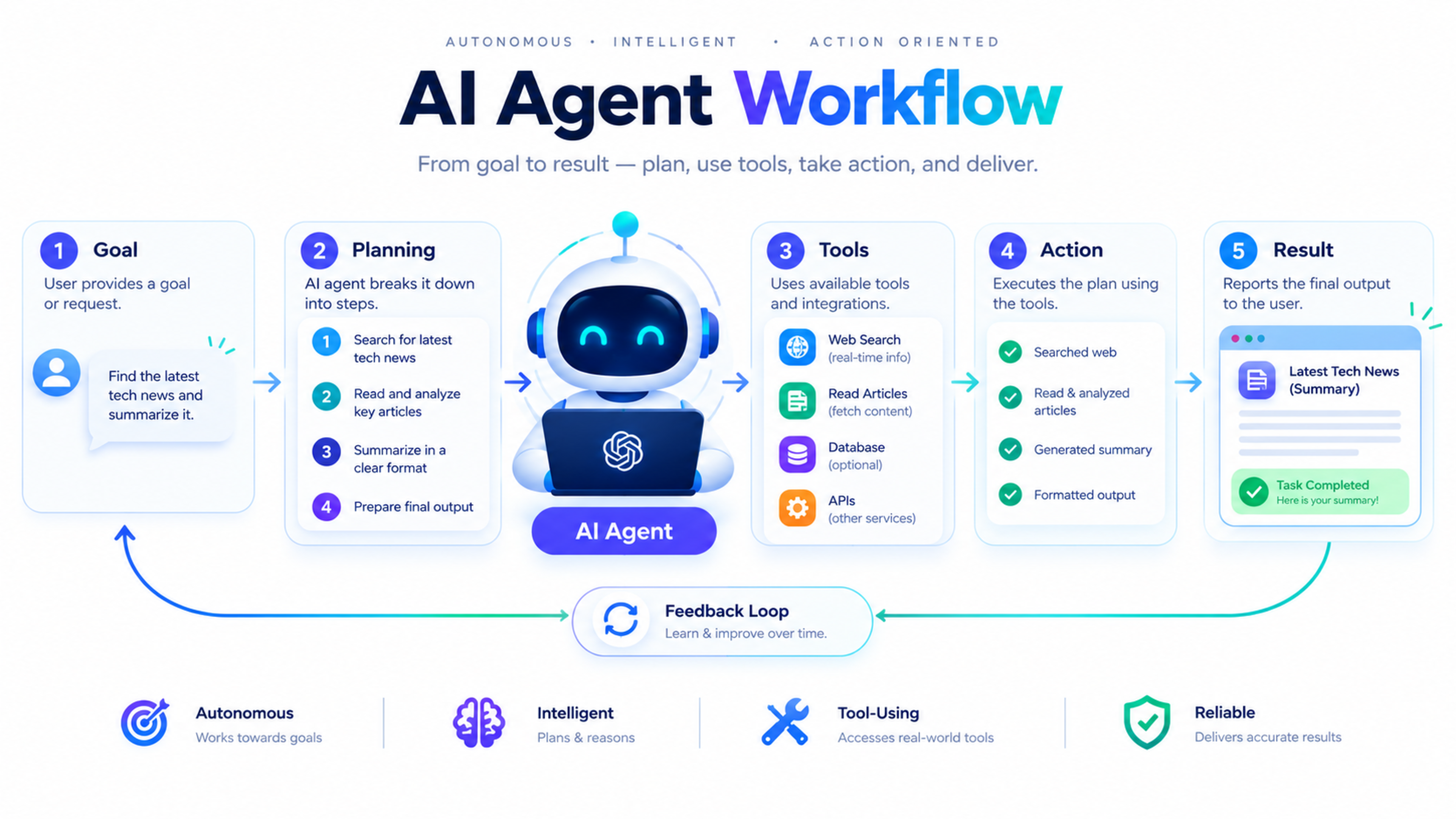
Agentic AI is artificial intelligence that can pursue a goal with limited human supervision. Instead of only answering a question or generating text, an AI agent can understand a task, plan the steps needed to complete it, use tools, take action, check the result, and adjust if something goes wrong.
For example, a normal AI chatbot may answer, “How do I follow up with a new lead?” An agentic AI system can actually read the lead’s enquiry, check the CRM, draft a personalized follow-up, schedule a reminder, notify the sales team, and update the lead status.
This shift matters because businesses are moving from using AI only for content and conversation to using it for operational work. Agentic AI can connect to CRMs, support desks, calendars, billing systems, databases, and other business tools to complete real workflows.
What is agentic AI?
Agentic AI is a type of artificial intelligence designed to act independently toward a defined goal. It uses reasoning, memory, tools, and feedback to decide what to do next.
A simple way to understand it is:
Generative AI creates something: text, an image, code, or a summary.
Agentic AI completes something: a workflow, a task, a decision, or a multi-step process.
An agentic AI system receives a goal, plans the steps needed to achieve it, executes those steps using tools and integrations, evaluates progress, and adjusts when results are not good enough.
What is an AI agent?
An AI agent is a software system that can perceive information, reason about it, and take action to achieve an objective. It may work alone or as part of a group of agents.
An AI agent usually has four core capabilities:
Perception: It reads input from a user, database, email, form, document, or connected system.
Reasoning: It decides what information is relevant and what steps are needed.
Action: It uses tools or APIs to complete tasks.
Feedback: It checks the result and adjusts its approach if needed.
For example, an AI support agent may read a customer complaint, check the order status in a database, identify the issue, draft a response, issue a refund if policy allows, and escalate only unusual cases to a human.
Agentic AI vs generative AI
Many people use “AI” as one general term, but agentic AI and generative AI solve different problems.
Area | Generative AI | Agentic AI |
|---|---|---|
Main purpose | Create content | Complete tasks |
Input | A prompt or question | A goal, request, or workflow |
Output | Text, image, code, summary | Actions, updates, decisions, completed workflows |
Human involvement | Usually prompt-driven | Limited supervision, with human approval where needed |
Tools | May or may not use tools | Usually connects to tools, APIs, and business systems |
Example | Write a follow-up email | Read a lead, draft the email, update CRM, schedule follow-up |
Generative AI is still important inside agentic AI. An agent may use a generative model to write an email, summarize a document, interpret a customer request, or create a report. But the agent goes further by deciding what to do with that output.
How agentic AI works
Agentic AI follows a loop: understand the goal, plan, act, observe, and improve.
1. Receives a goal
The process begins when a user or system gives the agent a goal.
Examples include:
“Follow up with every new lead from today.”
“Check why this customer’s order is delayed.”
“Prepare a weekly sales report.”
“Find unavailable products and notify the inventory team.”
“Process refund requests that meet company policy.”
2. Plans the workflow
The agent breaks the goal into smaller steps.
For a lead follow-up task, it may plan:
Get today’s new leads from the CRM
Check whether each lead already has a follow-up
Read the enquiry message
Identify the service the customer is interested in
Draft a personalized response
Send the response or save it for approval
Create a follow-up reminder
Update the CRM record
3. Uses tools and integrations
An AI agent becomes useful when it can connect to real business systems.
Common integrations include:
CRM systems
Email platforms
Calendars
Customer-support tools
Databases
Payment systems
Ecommerce platforms
Google Sheets
Slack or Microsoft Teams
Project-management tools
Internal APIs
An MCP server can act as a secure connection layer that allows AI models to access external applications, databases, APIs, and business systems through a standard protocol.
4. Takes action
The agent performs the task using the tools available to it.
It may:
Send an email
Create a CRM record
Update an order status
Generate a report
Assign a task
Schedule a meeting
Check inventory
Escalate a support ticket
Trigger a workflow
5. Checks the result
A well-designed agent does not assume success. It checks whether the action was completed.
For example, after sending a follow-up email, it may confirm whether the email was sent, log the activity in the CRM, and schedule the next follow-up.
6. Learns from feedback
Some systems improve through feedback, rules, and human review. A human may correct a response, approve an action, or change a business rule. The agent can then follow that improved pattern in future tasks.
Example: AI agent for lead follow-up
Imagine a service business receives a new enquiry through its website.
The customer writes:
“I need a business website with online booking and payment. Can you share a rough cost and timeline?”
Without agentic AI, a staff member must manually read the message, check the service page, prepare a response, save the lead, and set a reminder.
With an AI agent, the workflow could look like this:
The website form sends the enquiry to the AI agent.
The agent identifies the customer’s need: business website, booking system, and payment integration.
It checks the CRM to see whether the customer already exists.
It creates or updates the lead record.
It drafts a personalized response with relevant service information.
It sends the response or sends it to a salesperson for approval.
It assigns the lead to the correct team member.
It creates a follow-up task for the next business day.
It logs the full activity in the CRM.
The human team still controls strategy, pricing decisions, and final approval. The AI agent removes repetitive coordination work.
Example: AI agent for customer support
A customer messages an online store:
“My order has not arrived yet. Can you check it?”
An AI support agent can:
Identify the customer and order number.
Check the delivery status in the order system.
Detect whether the parcel is delayed.
Explain the current status to the customer.
Offer a replacement, refund, or escalation if policy allows.
Create a support ticket if human help is needed.
Notify the support team only for complex cases.
This type of workflow is already common in customer-service use cases, where AI agents can resolve cases, process refunds or replacements, and follow up automatically within defined rules.
Business use cases for agentic AI
Agentic AI is most useful for repetitive, rule-based, multi-step work. It is less suitable for tasks that require complex judgement, sensitive decisions, or full human accountability without oversight.
Customer support
AI agents can:
Answer common questions
Check order or booking status
Categorize support tickets
Draft responses
Escalate complex issues
Follow up with customers
Summarize conversations
Sales and lead management
AI agents can:
Qualify new leads
Route enquiries to the right team
Draft follow-up messages
Update CRM records
Schedule meetings
Create follow-up reminders
Identify inactive leads
Operations and administration
AI agents can:
Process invoices
Prepare reports
Monitor inventory
Reconcile records
Manage approvals
Coordinate tasks between teams
Detect missing information
Marketing
AI agents can:
Repurpose blog content for social media
Prepare email drafts
Analyze campaign performance
Identify content gaps
Create reporting summaries
Schedule approved posts
Software development
AI agents can assist with:
Code review
Test-case generation
Bug triage
Documentation
Deployment checks
Monitoring production issues
These use cases should always include human review, especially for code deployment, financial decisions, customer refunds, and sensitive data.
What is MCP in agentic AI?
MCP stands for Model Context Protocol. It is an emerging standard that helps AI models connect securely with external tools, data sources, APIs, and business systems.
In simple terms, MCP gives an AI agent a structured way to use tools.
For example, an MCP tool might allow an AI agent to:
Search a database
Update a CRM record
Check a calendar
Create a support ticket
Run an automation
Retrieve product information
Send a notification
Without a protocol like MCP, connecting an AI model to business systems often requires custom integrations for every tool. MCP helps standardize that connection layer.
Benefits of agentic AI for business
1. Saves time on repetitive work
AI agents can handle repetitive coordination tasks, such as copying data between systems, sending reminders, categorizing requests, and preparing reports.
2. Improves response time
An AI agent can respond to a new lead or support request immediately, even outside business hours.
3. Reduces manual errors
When systems are connected properly, AI agents can reduce copy-paste mistakes and missing follow-ups.
4. Improves team productivity
Staff can focus on sales conversations, customer relationships, strategy, and complex problem-solving instead of routine admin work.
5. Creates consistent workflows
AI agents follow defined rules, which can make processes more consistent across a team.
6. Supports better decisions
Agents can collect data from multiple systems and prepare summaries, alerts, or reports for decision-makers.
Limitations and risks
Agentic AI is powerful, but it is not a replacement for good business processes or human judgement.
1. Wrong data leads to wrong actions
If the CRM data is outdated or the connected system contains errors, the agent may make incorrect decisions.
2. Security must be managed carefully
An AI agent with access to email, CRM, payments, or customer data must have strict permissions. Never give an agent more access than it needs.
3. Human review is still important
For refunds, legal decisions, medical advice, hiring, financial approvals, and customer-facing communication, a human should review sensitive actions.
4. Poorly designed workflows create problems
Automating a broken process does not fix it. First improve the workflow, then automate it.
5. AI can make mistakes
AI systems can misunderstand context or generate incorrect information. Businesses should test agents carefully before giving them access to critical systems.
How to start with agentic AI
Start small. The best first project is usually a workflow that is repetitive, measurable, and low-risk.
Step 1: Choose one workflow
Good starting points include:
New lead follow-up
FAQ customer support
Appointment reminders
Invoice follow-up
Weekly reporting
Support-ticket categorization
Content repurposing
Step 2. Map the current process
Write down every step a person currently takes. Identify what information is needed, which tools are used, and where delays happen.
Step 3. Define rules and limits
Decide what the AI agent can do automatically and what requires human approval.
For example:
The agent can draft a reply, but a human approves it.
The agent can update a CRM field, but cannot issue refunds.
The agent can create a task, but cannot delete customer data.
Step 4. Connect only necessary tools
Start with the minimum number of integrations. If the workflow only needs the website form, CRM, and email system, do not connect every business tool at once.
Step 5. Test with real cases
Run the agent on historical enquiries, sample support tickets, or test leads. Measure accuracy, response quality, and time saved.
Step 6. Add human review
Keep a human in the loop for sensitive or high-value actions. This builds trust and reduces risk.
Step 7. Measure results
Track:
Time saved
Response time
Leads followed up
Support tickets resolved
Error rate
Customer satisfaction
Conversion rate
Cost per completed task
Agentic AI vs traditional automation
Traditional automation follows fixed rules. Agentic AI can handle more variation and make decisions based on context.
Feature | Traditional automation | Agentic AI |
|---|---|---|
Workflow | Fixed rules | Goal-based and adaptive |
Input | Structured trigger | Text, email, document, database, or system event |
Decision-making | Limited | Context-aware reasoning |
Tools | Usually predefined | Connects to tools and APIs |
Best for | Simple repetitive tasks | Multi-step workflows with variation |
Example | Send a welcome email after signup | Read enquiry, qualify lead, draft reply, update CRM, schedule follow-up |
Traditional automation is still useful. Many businesses need both: simple automation for predictable tasks and agentic AI for workflows that require understanding and judgement.
Is agentic AI right for your business?
Agentic AI may be a good fit if your business:
Receives repeated enquiries through forms, email, or chat
Uses multiple tools that do not communicate well
Spends time manually copying data between systems
Struggles with delayed lead follow-up
Handles many similar support requests
Needs regular reports from different platforms
Wants to improve response time without hiring more staff
It may not be the right first step if your process is unclear, your data is unorganized, or you need full human control over every decision.
How Global IT Services can help
Global IT Services helps businesses design and implement practical AI automation systems, including AI-powered lead follow-up, customer support, reporting, CRM workflows, and business process automation.
If you are unsure where to start, begin with one workflow that consumes the most staff time. A well-designed AI agent should save time, reduce errors, and make your team more effective—not add complexity.
Frequently Asked Questions
What is agentic AI in simple terms?
Agentic AI is AI that can complete tasks independently. Instead of only answering a question, it can plan steps, use tools, take action, and check whether the task was completed.
What is the difference between AI agents and chatbots?
A chatbot mainly responds to questions in a conversation. An AI agent can understand a goal, plan a workflow, connect to tools, and complete actions such as updating a CRM, sending an email, or creating a support ticket.
What is the difference between agentic AI and generative AI?
Generative AI creates content such as text, images, or code. Agentic AI uses AI to complete tasks and workflows, often using generative AI as one part of the process.
Can agentic AI replace employees?
Agentic AI usually replaces repetitive tasks, not entire roles. It helps teams save time and focus on sales, customer relationships, strategy, and complex problem-solving.
Is agentic AI safe for business use?
It can be safe when businesses use proper access controls, human approval for sensitive actions, secure integrations, monitoring, and clear rules. Never give an AI agent unnecessary access to payments, customer data, or critical systems.
What is MCP in AI?
MCP stands for Model Context Protocol. It is a standard that helps AI models securely connect with external tools, APIs, databases, and business systems.
What is a good first AI agent for a small business?
A good first AI agent is usually lead follow-up, FAQ customer support, appointment reminders, invoice follow-up, or weekly reporting. These workflows are measurable and can deliver value quickly.
Feedback & Discussion
Have questions or insights? Share your thoughts below.