
Next.js vs React: Which Should You Use for Your Next Web Project?
Compare Next.js vs React for websites and web applications. Learn the differences in SEO, rendering, performance, routing, scalability, and project suitability.
Next.js vs React: Which Should You Use for Your Next Web Project?
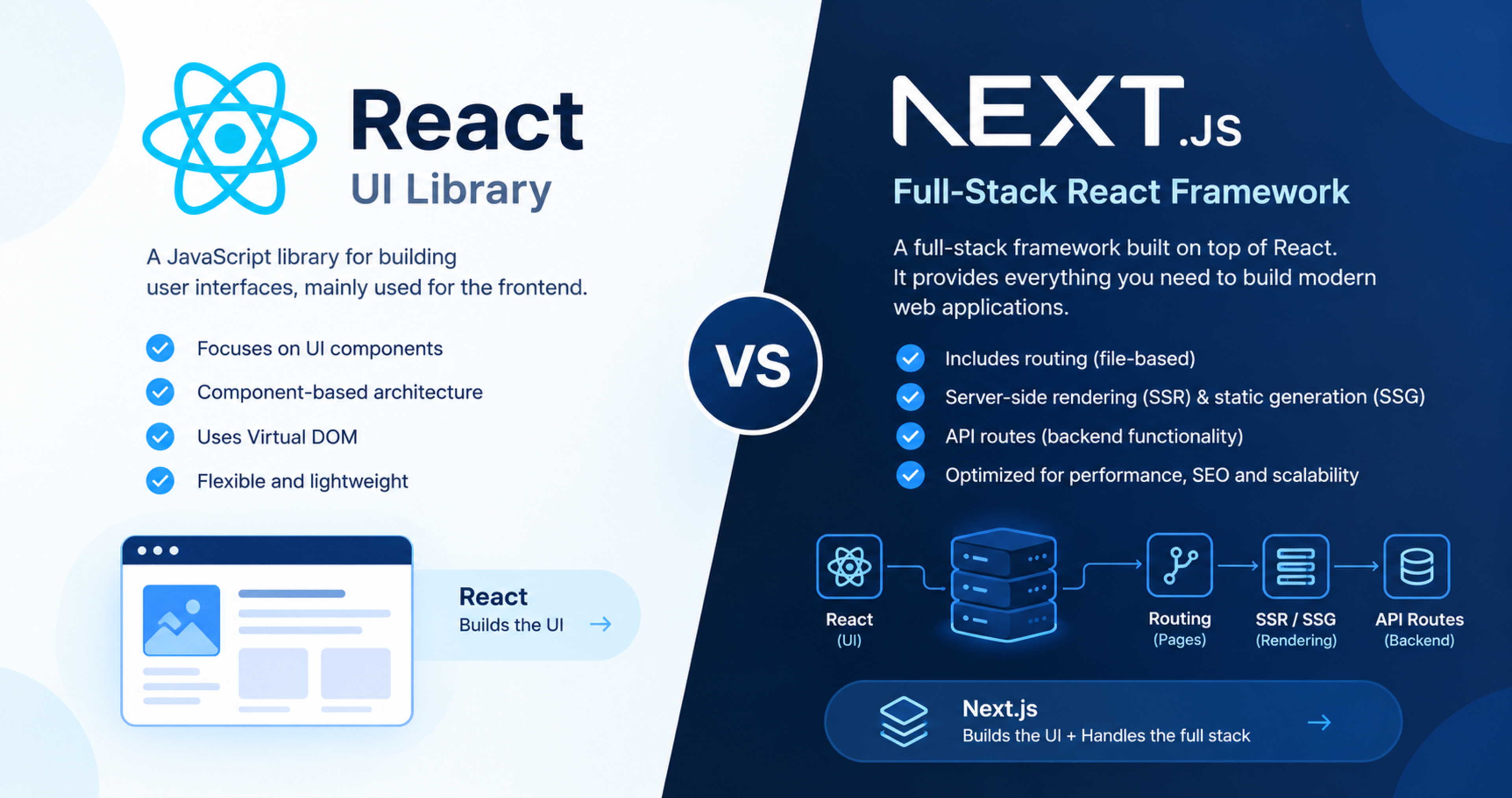
Next.js vs React is not a battle between two competing products. React is a JavaScript library for building user interfaces, while Next.js is a framework built on top of React that adds routing, rendering, performance optimisation, and backend capabilities.
If you need complete control over a custom interface, React may be enough. If you need a production-ready website with strong SEO, fast loading, server-side rendering, API routes, and scalable architecture, Next.js is usually the better starting point.
This guide explains the real differences between Next.js and React, when to use each, and how to choose based on your project goals.
What is React?
React is a JavaScript library developed by Meta for building user interfaces. It allows developers to create reusable UI components, manage state efficiently, and build interactive web applications.
React is widely used for:
Single-page applications
Dashboards
Admin panels
Customer portals
Interactive product interfaces
Mobile apps through React Native
React focuses mainly on the view layer—what users see and interact with. It does not include a complete solution for routing, server-side rendering, image optimisation, API routes, or deployment architecture by default.
What is Next.js?
Next.js is a React framework developed by Vercel. It adds production-ready features on top of React, including file-based routing, server-side rendering, static site generation, API routes, image optimisation, font optimisation, and built-in performance tooling.
Next.js is commonly used for:
Business websites
Marketing websites
Ecommerce stores
SaaS products
Customer portals
Blogs and content websites
Dashboards
SEO-sensitive web applications
Next.js gives developers more structure and more built-in tools, which can reduce the amount of configuration needed for a production website.
Next.js vs React: Quick comparison
Feature | React | Next.js |
|---|---|---|
Type | JavaScript UI library | React framework |
Main strength | Flexible UI development | Full-stack web application development |
Routing | Requires a router such as React Router | Built-in file-based routing |
Rendering | Mostly client-side by default | SSR, SSG, ISR, and client-side rendering |
SEO | Requires extra setup for strong SEO | Strong SEO support through server rendering |
API backend | Requires a separate backend | API routes and server functions included |
Image optimisation | Requires external tools or setup | Built-in image optimisation |
Learning curve | Easier for basic UI work | Slightly higher due to framework concepts |
Best for | Dashboards, apps, custom interfaces | Websites, ecommerce, SaaS, SEO-driven products |
Deployment | Requires more configuration | Optimised for modern deployment platforms |
The main difference: library vs framework
React is a library. It gives you tools to build interfaces but leaves many architectural decisions to you.
Next.js is a framework. It provides conventions and built-in features for building complete web applications.
Think of it this way:
React gives you the engine.
Next.js gives you the engine, chassis, routing system, performance tools, and deployment structure.
You can build a complete application using React alone, but you will often need to add routing, data fetching, server-side rendering, image optimisation, and backend services yourself.
Rendering: The biggest difference
Rendering determines how a page is generated and delivered to the user. It affects speed, SEO, user experience, and server load.
Client-side rendering in React
In a typical React single-page application, the browser first downloads JavaScript, then renders the page.
This can work well for dashboards and applications behind a login. However, it can create challenges for SEO because important content may not be immediately available in the initial HTML response.
Server-side rendering in Next.js
Next.js can render pages on the server before sending them to the browser. This means users and search engines can receive meaningful HTML earlier.
Server-side rendering is useful for:
Service pages
Blog posts
Product pages
Ecommerce category pages
Landing pages
Content-heavy websites
Static site generation in Next.js
Next.js can also generate pages at build time. This is useful for pages that do not change often, such as service pages, company pages, and blog articles.
Static pages can load very quickly because they can be served from a CDN.
Incremental static regeneration
Next.js supports incremental static regeneration, which allows static pages to be updated after deployment without rebuilding the entire website.
This is useful for ecommerce products, blog posts, and pages that change occasionally.
SEO: Next.js vs React
Both React and Next.js can rank in Google. However, Next.js usually makes strong SEO easier to implement.
Next.js provides better control over:
Server-side rendering
Metadata and title tags
Open Graph tags
Canonical URLs
Structured data
Sitemaps
Robots.txt
Image optimisation
Page speed
Core Web Vitals
For businesses that depend on organic search, Next.js is often the stronger choice because important content can be rendered on the server and made available to search engines more reliably.
React can still rank well, but it may require additional configuration, prerendering, or a separate SEO-focused architecture.
Performance and Core Web Vitals
Performance affects user experience, conversions, and search visibility. Core Web Vitals measure loading performance, interactivity, and visual stability.
Next.js includes performance-focused features such as:
Image optimisation
Font optimisation
Code splitting
Automatic static optimisation
Server-side rendering
Built-in caching options
Efficient routing and prefetching
These features can help improve Largest Contentful Paint, Interaction to Next Paint, and Cumulative Layout Shift when the application is built properly.
React can also be fast, but developers need to manage performance manually through code splitting, lazy loading, image optimisation, and bundle-size control.
Routing
React does not include routing by default. Developers commonly add React Router or another routing library.
Next.js includes file-based routing. A file inside the app or pages directory becomes a route automatically.
For example:
app/about/page.tsxbecomes/aboutapp/services/web-development/page.tsxbecomes/services/web-developmentapp/blog/[slug]/page.tsxbecomes a dynamic blog URL
This makes Next.js especially convenient for websites with many pages, blog posts, service pages, and product pages.
Backend and API routes
React focuses on the frontend. If you need a backend, you usually build it separately using Node.js, Laravel, Django, or another server technology.
Next.js can include API routes and server-side functions within the same project. This makes it easier to build:
Contact forms
Newsletter signups
Authentication flows
Dashboard APIs
Payment integrations
Internal tools
Small-to-medium SaaS applications
For large or complex enterprise systems, a dedicated backend may still be appropriate. But Next.js can handle many business applications without needing a separate frontend and backend project.
When to choose React
Choose React if your project is:
A dashboard behind login
An internal admin panel
A highly interactive web application
A product interface where SEO is not important
Part of a larger frontend architecture
A project where your team already has a strong React setup
React gives developers flexibility. It is a good choice when the interface is complex and the application does not depend heavily on organic search traffic.
React example
A company builds an internal CRM dashboard for its sales team. Users log in, view leads, update statuses, and generate reports.
In this case, SEO is not important because the dashboard is private. React can be a good choice because the team needs a highly interactive interface.
When to choose Next.js
Choose Next.js if your project is:
A business website
A marketing website
A blog or content platform
An ecommerce store
A SaaS product with public pages
A customer portal with SEO needs
A multilingual website
A website that needs fast performance and strong SEO
A product that needs both frontend and backend features
Next.js is especially useful when organic traffic, page speed, and search visibility are important.
Next.js example
A service business wants a website with service pages, blog articles, case studies, contact forms, and strong Google visibility.
Next.js is a better fit because it supports server-side rendering, SEO-friendly metadata, fast pages, image optimisation, and scalable routing.
Next.js vs React for ecommerce
For ecommerce, Next.js is often the stronger choice because product pages, category pages, and landing pages need to be fast and discoverable in search engines.
Next.js can support:
SEO-friendly product URLs
Server-rendered product pages
Fast image loading
Structured data for products
Dynamic routing
Checkout integrations
Inventory and order systems
Personalised product recommendations
React can still power the frontend of an ecommerce store, but Next.js provides more built-in tools for a complete ecommerce experience.
Next.js vs React for SaaS
For SaaS products, the choice depends on the product structure.
Use React if the product is mainly a private dashboard or application.
Use Next.js if the product needs:
Public marketing pages
Pricing pages
Blog content
SEO-driven landing pages
Authentication
Dashboard features
API routes
Subscription flows
Many SaaS products use Next.js because it can handle both the public website and the application dashboard in one project.
Can you use React inside Next.js?
Yes. Next.js is built on React. When you use Next.js, you are still using React components, hooks, state, and ecosystem tools.
The real question is not “React or Next.js?” It is:
“Do I need only a React interface, or do I need a complete React-based web application framework?”
Common mistakes to avoid
Avoid these mistakes:
Choosing React for an SEO-heavy website without planning rendering
Choosing Next.js for a simple private dashboard when it adds unnecessary complexity
Ignoring Core Web Vitals while choosing a framework
Using client-side rendering for pages that need strong SEO
Adding too many third-party scripts
Not planning image optimisation
Mixing outdated React patterns with modern Next.js features
Building a custom backend when Next.js API routes are enough
Choosing a framework without considering long-term maintenance
How to choose: Simple decision framework
Choose React if:
Your project is private or behind login.
SEO is not a priority.
You need a highly interactive interface.
Your team already has a React-based architecture.
You want maximum flexibility without framework conventions.
Choose Next.js if:
You need organic search traffic.
You need fast public-facing pages.
You need blog, service, product, or landing pages.
You want built-in routing and rendering options.
You need both frontend and backend features.
You want a scalable foundation for a business website or SaaS product.
How Global IT Services can help
Global IT Services builds custom Next.js websites, React applications, business portals, ecommerce platforms, and SEO-ready web applications.
If you are unsure whether React or Next.js is right for your project, start with your business goal: Is the project mainly a private tool, or does it need to attract customers through search?
Frequently Asked Questions
What is the difference between Next.js and React?
React is a JavaScript library for building user interfaces. Next.js is a React framework that adds routing, server-side rendering, static generation, API routes, image optimisation, and other production features.
Is Next.js better than React for SEO?
Next.js is usually better for SEO because it supports server-side rendering, static generation, metadata control, fast page delivery, and better control over how search engines access content.
Is Next.js easier than React?
Next.js can be easier for building complete websites because routing, rendering, and optimisation are built in. However, it has more framework concepts to learn than basic React.
Can I use React with Next.js?
Yes. Next.js is built on React. When you build a Next.js application, you use React components and React features within the Next.js framework.
Which is better for a business website: React or Next.js?
Next.js is usually better for a business website because it supports SEO, fast loading, server-side rendering, blog content, service pages, and scalable routing.
Which is better for a dashboard: React or Next.js?
React is often a good choice for a private dashboard where SEO is not important. Next.js can still be used if the project also needs public marketing pages, authentication, or API routes.
Is Next.js good for ecommerce?
Yes. Next.js is a strong choice for ecommerce because it supports fast product pages, SEO-friendly URLs, image optimisation, structured data, dynamic routing, and scalable architecture.
Fullstack Web & App Development
High-performance, scalable web platforms engineered for global reach and conversions.
Explore this service
Feedback & Discussion
Have questions or insights? Share your thoughts below.