
Google Business Profile Optimisation for UK Businesses: A Practical 2026 Guide
Learn how to optimise your Google Business Profile for UK local search. Improve Google Maps visibility, reviews, calls, bookings, and customer trust.
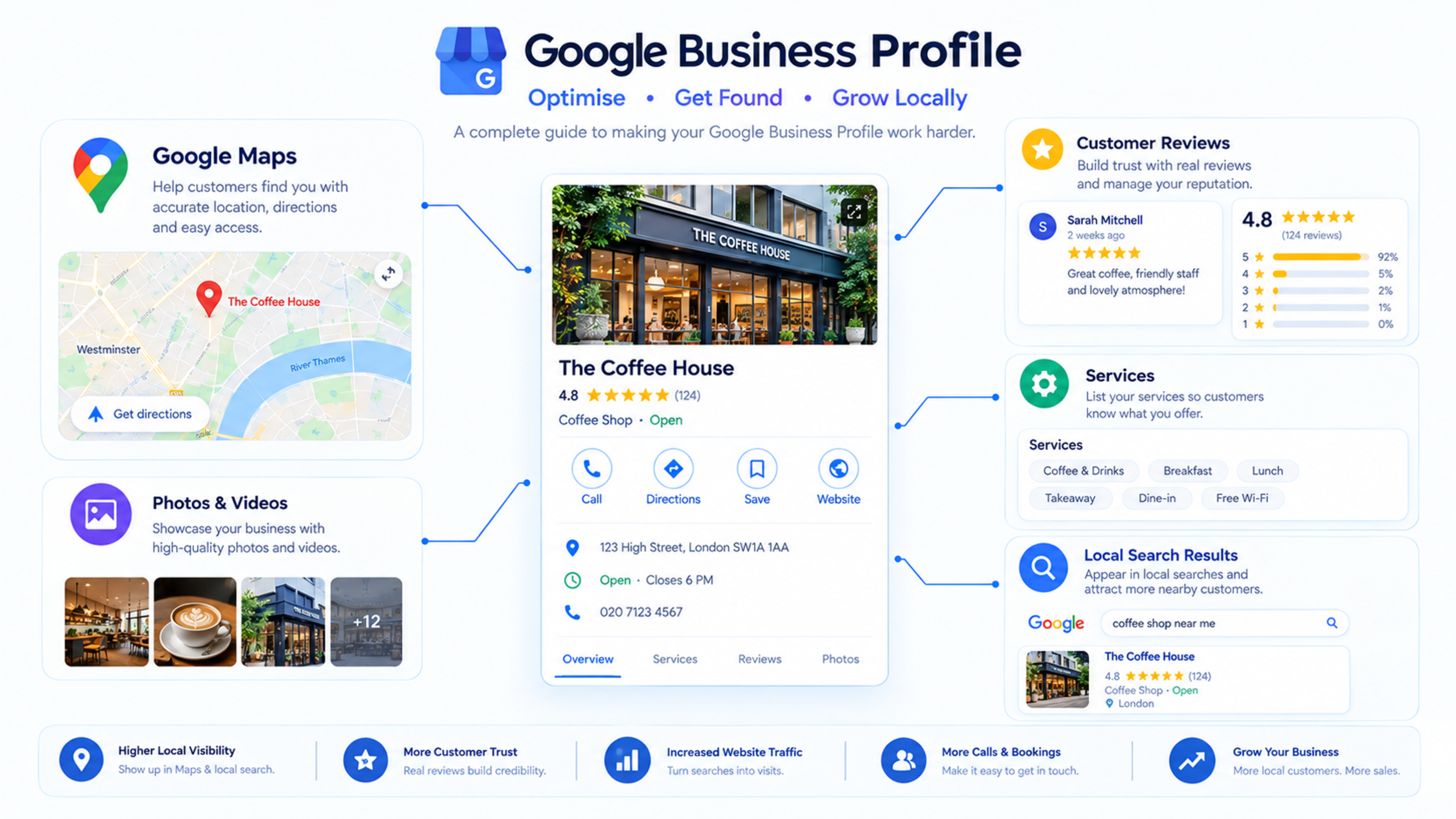
Google Business Profile Optimisation for UK Businesses: A Practical 2026 Guide
Your Google Business Profile is often the first thing a local customer sees before visiting your website. It controls how your business appears in Google Search and Google Maps, making it one of the most important tools for UK local SEO.
A complete, accurate, and active Google Business Profile can help you get more phone calls, direction requests, website visits, bookings, and customer reviews. An incomplete profile can make even a good business look less trustworthy.
This guide explains how to optimise your Google Business Profile for UK local search in 2026.
What is Google Business Profile?
Google Business Profile, previously known as Google My Business, is a free tool that lets businesses manage how they appear on Google Search and Google Maps.
It displays information such as:
Business name
Address or service area
Phone number
Website
Opening hours
Reviews
Photos
Services
Products
Directions
Booking links
Questions and answers
For local searches such as “plumber near me,” “dentist in Manchester,” or “SEO agency London,” Google often shows business profiles alongside map results.
Why Google Business Profile matters
Google Business Profile matters because local customers often want a nearby, trusted, and immediately contactable business.
A strong profile can help you:
Appear in Google Maps and local search results
Receive more phone calls
Get more direction requests
Increase website visits
Build trust through reviews
Show services, products, and offers
Compete with larger local businesses
Support mobile customers searching on the go
Google Business Profile, consistent business information, reviews, and local content remain important local SEO signals.
Google Business Profile optimisation checklist
Use this checklist to improve your profile:
Claim and verify your profile
Use your exact business name
Add accurate contact details
Choose the right primary category
Add relevant secondary categories
Write a clear business description
Add services and service areas
Upload real photos
Keep opening hours updated
Collect genuine reviews
Respond to reviews
Add products or services
Add booking or enquiry links
Post regular updates
Answer customer questions
Track calls, directions, and website clicks
Step 1: Claim and verify your profile
If you have not claimed your Google Business Profile, search for your business on Google and look for the option to claim it.
Verification confirms that you are the rightful owner of the business. Depending on your business type and location, Google may verify ownership by phone, email, video, or postcard.
Never create a profile for a business you do not own or manage.
Step 2: Use your exact business name
Use your real trading name exactly as customers recognise it.
For example, if your business is called Bright Smile Dental, use:
textBright Smile Dental
Do not change it to:
textBright Smile Dental | Best Dentist in Manchester
Adding keywords or location names to your business name can violate Google’s guidelines and may make your profile look less trustworthy.
Step 3: Add accurate contact details
Make sure your business information is accurate and consistent everywhere online.
Check:
Business name
Address
Phone number
Website URL
Email address
Opening hours
Service areas
Your name, address, and phone number—often called NAP—should match your website, social profiles, directories, and invoices.
Consistent business information helps customers and search engines trust your business.
Step 4: Choose the right categories
Your primary category should describe your main service.
Examples include:
Plumber
Electrician
Dentist
Accountant
Solicitor
Web designer
Marketing agency
Hair salon
Physiotherapist
Restaurant
Then add secondary categories only if they genuinely match services you provide.
For example, a web design agency may use:
Primary: Web designer
Secondary: Internet marketing service, Website designer, Marketing agency
Do not choose unrelated categories just to appear in more searches.
Step 5: Write a useful business description
Your business description should explain what you do, who you help, and what makes your business useful.
Keep it clear and customer-focused.
Example:
Bright Smile Dental provides private and NHS dental care in Manchester. We offer routine check-ups, hygiene appointments, cosmetic dentistry, and emergency dental treatment for patients across Greater Manchester.
Avoid keyword stuffing. Write naturally and focus on the customer.
Step 6: Add services and service areas
Add every service you want customers to find.
For a plumber, services may include:
Emergency plumbing
Boiler repair
Leak detection
Bathroom installation
Central heating repair
Pipe repairs
For a web agency, services may include:
Website design
Web development
Next.js development
Ecommerce development
Technical SEO
Website maintenance
If you serve customers at their location rather than at a physical shop, define your service areas clearly.
For example:
Manchester
Salford
Stockport
Altrincham
Sale
Didsbury
Step 7: Add high-quality photos
Photos help customers understand your business before contacting you.
Add real photos of:
Your shop, office, clinic, or premises
Your team
Your products
Your work
Customer-facing areas
Before-and-after work, where relevant
Vehicles or equipment, if relevant
Avoid using stock photos that do not represent your actual business.
Keep photos updated. A profile with recent, genuine photos usually looks more active and trustworthy.
Step 8: Keep opening hours accurate
Incorrect opening hours can frustrate customers and lead to missed enquiries.
Update your hours for:
Weekday hours
Weekend hours
Bank holidays
Seasonal changes
Special holiday hours
If you offer emergency services outside normal hours, make that clear in your services and business description.
Step 9: Collect genuine reviews
Reviews are one of the strongest trust signals for local businesses.
Ask happy customers to leave a review after:
Completing a job
Finishing an appointment
Delivering a service
Completing a purchase
Resolving a support request
Make it easy by sending a direct Google review link.
How to ask for reviews
Use a simple, honest request:
“Thank you for choosing us. If you were happy with our service, we would really appreciate a quick Google review. It helps other local customers find us.”
Do not:
Buy reviews
Offer payment for reviews
Ask only satisfied friends or family
Create fake reviews
Offer incentives in exchange for positive reviews
Step 10: Respond to every review
Respond to positive and negative reviews professionally.
For positive reviews:
“Thank you for your kind words, Sarah. We are glad we could help with your boiler repair. Please contact us any time if you need further support.”
For negative reviews:
“Thank you for your feedback, James. We are sorry to hear about your experience. Please contact our team at [phone/email] so we can look into this and resolve it properly.”
A professional response shows potential customers that you take feedback seriously.
Step 11: Add products, services, and offers
Use the relevant sections of your profile to show what you offer.
For example:
A restaurant can add popular dishes and menus.
A salon can add treatments and prices.
A retailer can add products.
A service business can add service descriptions.
A clinic can add treatments and booking information.
Keep descriptions clear and useful. Avoid vague text such as “best quality service.”
Step 12: Add booking or enquiry links
If customers can book online, add your booking link.
This could link to:
A booking page
A consultation form
A contact page
A quote request page
A reservation system
A calendar booking tool
Make the next step obvious. A customer should not have to search your website to find how to contact you.
Step 13: Use Google Posts
Google Posts let you share updates directly on your Business Profile.
Use them for:
Offers
Seasonal promotions
New services
Events
Important announcements
Blog articles
Customer reminders
For example, a restaurant could post about a weekend offer. A web agency could share a new SEO guide or case study.
Step 14: Answer customer questions
Customers can ask questions directly on your Google Business Profile.
Enable and monitor this feature. Answer questions clearly and promptly.
If the same questions appear repeatedly, add the answers to your website FAQ page and Google Business Profile services section.
Step 15: Track performance
Use the performance section in your Google Business Profile to monitor:
Phone calls
Direction requests
Website clicks
Booking clicks
Profile views
Search queries
Photo views
Review growth
Track these metrics monthly. If you receive many profile views but few calls, improve your services, photos, reviews, and call-to-action.
Common Google Business Profile mistakes
Avoid these mistakes:
Using keyword-stuffed business names
Leaving the profile incomplete
Using inconsistent contact details
Choosing inaccurate categories
Ignoring reviews
Using stock photos
Having incorrect opening hours
Not adding services or service areas
Buying fake reviews
Ignoring customer questions
Not tracking performance
Google Business Profile checklist
Use this checklist monthly:
Check business name, address, and phone number
Confirm opening hours
Review categories
Add or update services
Add new photos
Respond to reviews
Answer customer questions
Post an update or offer
Check website link
Check booking link
Review performance data
Ask recent happy customers for reviews
How long does Google Business Profile optimisation take?
Some improvements, such as adding accurate information and photos, can be completed quickly. Local visibility improvements usually take time.
A realistic expectation is:
1–4 weeks: Profile completion, photos, services, and review requests
1–3 months: Improved engagement and local visibility
3–6 months: Stronger performance in competitive local areas
Local SEO is ongoing. Competitors, reviews, search behaviour, and Google features change over time.
How Global IT Services can help
Global IT Services helps UK service businesses improve local visibility through Google Business Profile optimisation, local SEO, review strategy, local landing pages, technical SEO, and website development.
If your business is not appearing in Google Maps or local search results, start with a Google Business Profile and local SEO audit.
Frequently Asked Questions
What is Google Business Profile?
Google Business Profile is a free tool that lets businesses manage how they appear on Google Search and Google Maps. It shows information such as location, hours, reviews, services, photos, and contact details.
Is Google Business Profile free?
Yes. Creating and managing a Google Business Profile is free. Some optional third-party tools or services may charge for management, but Google’s core profile is free.
How do I rank higher on Google Maps?
Complete your profile, choose accurate categories, collect genuine reviews, add services and photos, keep information consistent, and respond to customer feedback.
How many reviews do I need for local SEO?
There is no exact number. Focus on getting a steady flow of genuine reviews from real customers. Quality, recency, and responses matter as well as quantity.
Can I add keywords to my Google Business Profile name?
No. Use your real business name. Adding keywords or locations that are not part of your official business name can violate Google’s guidelines.
How often should I update my Google Business Profile?
Review it at least monthly. Update photos, services, offers, opening hours, and posts regularly, especially during holidays or seasonal changes.
Does Google Business Profile help SEO?
Yes. It is especially important for local SEO because it helps your business appear in Google Maps, local pack results, and location-based searches.
Feedback & Discussion
Have questions or insights? Share your thoughts below.