
Cloud Hosting vs Shared Hosting: Which Is Better for a Business Website?
Compare cloud hosting vs shared hosting for business websites. Learn the differences in speed, security, scalability, cost, maintenance, and which option fits your business.
Cloud Hosting vs Shared Hosting: Which Is Better for a Business Website?
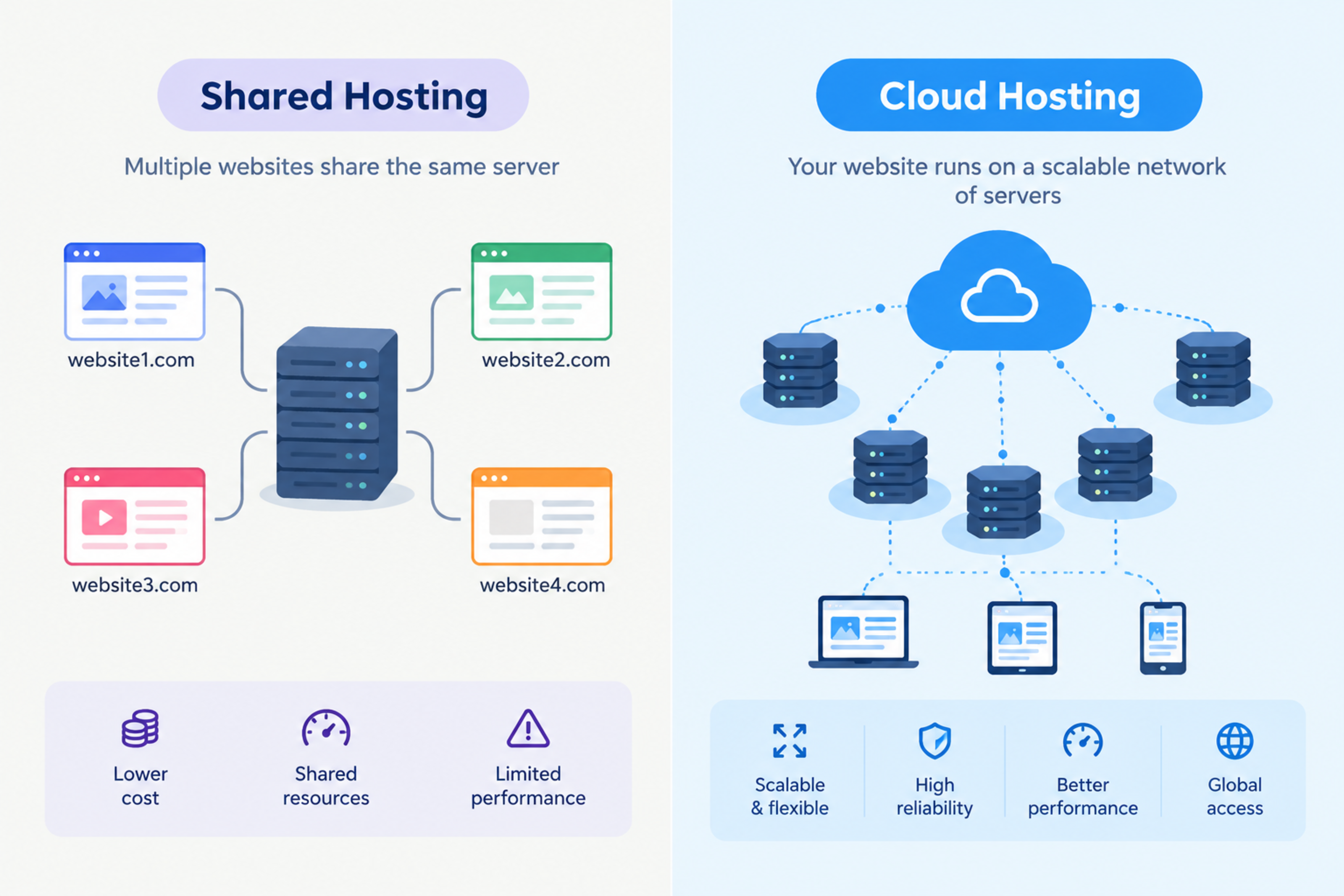
Shared hosting is usually cheaper and simpler, while cloud hosting offers better scalability, performance, and reliability for growing businesses. The right choice depends on your website traffic, budget, technical requirements, and long-term growth plans.
A small local business website may perform well on shared hosting. But an ecommerce store, SaaS product, booking platform, or high-traffic business website often needs cloud hosting or a managed cloud environment.
This guide explains the difference between cloud hosting and shared hosting, compares their costs and benefits, and helps you choose the right option for your business.
What is shared hosting?
Shared hosting means many websites are hosted on the same physical server. Each website shares resources such as CPU, memory, storage, and bandwidth.
It is one of the most affordable hosting options because the server cost is divided among many users.
Shared hosting is commonly used for:
Personal websites
Portfolios
Small business websites
Blogs
Local service websites
Low-traffic brochure websites
What is cloud hosting?
Cloud hosting uses a network of connected servers to host a website or application. Instead of relying on one physical server, your website can use resources from multiple servers.
If one server has a problem, another can help handle the workload. This makes cloud hosting more flexible and scalable.
Cloud hosting is commonly used for:
Ecommerce websites
SaaS products
Business applications
High-traffic websites
Customer portals
Booking systems
Web applications
Websites with changing traffic
Cloud hosting vs shared hosting: Quick comparison
Feature | Shared hosting | Cloud hosting |
|---|---|---|
Cost | Lower | Higher, but scalable |
Performance | Limited by shared resources | Better and more flexible |
Scalability | Limited | High |
Reliability | Depends on one server | Uses multiple servers |
Security | Basic, depends on provider | Stronger options available |
Technical management | Easier | Can require more expertise |
Best for | Small websites | Growing businesses and applications |
Traffic handling | Limited | Better for traffic spikes |
Custom configuration | Limited | High |
Maintenance | Usually managed by host | Can be managed or self-managed |
How shared hosting works
With shared hosting, your website shares a server with other websites. The hosting provider manages the server, operating system, security updates, and basic maintenance.
This makes shared hosting simple. You usually get a control panel, email accounts, database access, and one-click installation for platforms such as WordPress.
Benefits of shared hosting
Low monthly cost
Easy to set up
Managed by the hosting provider
Suitable for beginners
Good for simple websites
Includes basic email and database features
Limitations of shared hosting
Limited CPU, RAM, and bandwidth
Performance can be affected by other websites
Less control over server settings
Limited scalability
Security risk can increase if another site on the server is compromised
Not ideal for high-traffic or resource-heavy applications
How cloud hosting works
Cloud hosting distributes your website across a network of servers. Resources can be added or reduced based on demand.
For example, if your ecommerce store receives a traffic spike during a festival sale, cloud hosting can allocate more resources to handle the traffic.
Benefits of cloud hosting
Better scalability
More reliable uptime
Better handling of traffic spikes
Improved performance options
More control over server configuration
Suitable for web applications
Easier to scale as the business grows
Limitations of cloud hosting
Can cost more than shared hosting
May require technical knowledge
Costs can increase with usage
Requires proper configuration and monitoring
Security depends on correct setup
More moving parts to manage
Performance: Which is faster?
Cloud hosting is usually faster for growing websites because it can provide more dedicated resources and scale during traffic spikes.
Shared hosting can be fast for a small website with low traffic. However, if another website on the same server uses excessive resources, your website may slow down.
For business websites where speed affects enquiries, sales, and SEO, performance should be a major consideration. Core Web Vitals measure loading performance, interactivity, and visual stability, all of which can be affected by hosting quality.
Security: Which is safer?
Both options can be secure, but cloud hosting usually offers more advanced security controls.
Shared hosting security depends heavily on the hosting provider. Because websites share the same server, a vulnerability in one website can sometimes affect others if server isolation is weak.
Cloud hosting can provide:
Isolated environments
Private networks
Firewalls
Advanced access controls
Automated backups
Monitoring and alerts
Load balancing
DDoS protection
Better control over server configuration
However, cloud hosting is not automatically secure. Misconfigured cloud permissions, exposed API keys, and poor access control can create serious risks.
Scalability: The biggest difference
Scalability is where cloud hosting clearly wins.
With shared hosting, your website may slow down or face limits when traffic increases. Upgrading often means moving to a higher shared plan or migrating to a VPS or cloud server.
With cloud hosting, resources can scale up or down based on demand. This is useful for:
Ecommerce sales campaigns
Seasonal traffic spikes
Marketing campaigns
New product launches
Booking surges
SaaS product growth
Cost comparison
Shared hosting is cheaper at the beginning. Cloud hosting can cost more, but it may be more cost-effective as your business grows.
Hosting type | Typical monthly cost | Best for |
|---|---|---|
Shared hosting | Low | Small websites and blogs |
VPS hosting | Medium | Growing websites needing more control |
Cloud hosting | Medium to high | Business applications and scalable websites |
Managed cloud hosting | Higher | Businesses wanting performance without managing servers |
The cheapest option is not always the best value. A slow website can cost more in lost leads, poor user experience, and lower search visibility.
Which hosting is best for WordPress?
For a small WordPress website, quality shared hosting can be enough.
Choose shared hosting if:
Your website has low traffic.
You only need a brochure website or blog.
You do not need custom server configuration.
You want the lowest possible cost.
Your hosting provider offers good performance and support.
Choose cloud hosting if:
Your WordPress website receives high traffic.
You use WooCommerce or membership features.
You need better performance and security.
You want staging environments and automated backups.
You expect traffic spikes from campaigns or seasonal sales.
Which hosting is best for Next.js?
For Next.js websites and applications, cloud hosting or a managed platform is usually the better choice.
Next.js applications often need:
Server-side rendering
API routes
Server functions
Environment variables
Build pipelines
CDN delivery
Scalable deployment
Shared hosting is generally not ideal for modern Next.js applications because it is designed mainly for traditional PHP-based websites.
For Next.js, consider managed cloud platforms, Vercel-style deployments, container-based cloud hosting, or a VPS with proper Node.js configuration.
When to choose shared hosting
Choose shared hosting if:
You are launching a small business website.
Your traffic is low.
Your website is mainly informational.
You have a limited budget.
You do not need custom server configuration.
You want simple, managed hosting.
Shared hosting can be a practical starting point, but choose a reputable provider with good uptime, support, backups, and security practices.
When to choose cloud hosting
Choose cloud hosting if:
Your website receives growing traffic.
You run an ecommerce store.
You operate a SaaS product or web application.
You need custom server configuration.
You expect traffic spikes.
You need better security and reliability.
You want to scale without changing hosting environments frequently.
Cloud hosting is especially useful for businesses that view their website as a growth channel rather than just an online brochure.
Questions to ask before choosing hosting
Ask your hosting provider or developer:
How much traffic can the plan handle?
What happens during a traffic spike?
Is the hosting environment isolated from other websites?
Are backups included, and how often are they taken?
Can backups be restored easily?
What security features are included?
Is SSL included?
What PHP, Node.js, and database versions are supported?
Can I upgrade without downtime?
What support is available if the website goes down?
Common hosting mistakes
Avoid these mistakes:
Choosing hosting only based on price
Ignoring backup and restore options
Not checking uptime guarantees
Using outdated PHP or Node.js versions
Storing backups only on the same server
Ignoring security updates
Choosing shared hosting for a resource-heavy application
Not monitoring website performance
Failing to plan for traffic growth
How Global IT Services can help
Global IT Services helps businesses choose, configure, migrate, and maintain the right hosting environment for their websites and applications.
Whether you need shared hosting for a simple website or cloud infrastructure for an ecommerce platform, SaaS product, or Next.js application, the right setup should support your current needs and future growth.
Frequently Asked Questions
What is the difference between cloud hosting and shared hosting?
Shared hosting places many websites on one server, while cloud hosting uses a network of servers to provide more scalable and reliable resources.
Is cloud hosting better than shared hosting?
Cloud hosting is usually better for growing businesses, ecommerce stores, web applications, and websites with high or unpredictable traffic. Shared hosting is often enough for small, low-traffic websites.
Is shared hosting good for WordPress?
Yes. Shared hosting can be good for a small WordPress website with low traffic. For WooCommerce, membership sites, or high-traffic websites, cloud hosting is usually a better option.
Is cloud hosting more expensive?
Cloud hosting can cost more than shared hosting, especially as usage grows. However, it offers better scalability, performance, and reliability for growing businesses.
Can I migrate from shared hosting to cloud hosting later?
Yes. Most websites can be migrated from shared hosting to cloud hosting. Plan the migration carefully to avoid downtime, broken links, and SEO issues.
Which hosting is best for a business website?
For a small local business website, quality shared hosting may be enough. For an ecommerce store, booking platform, SaaS product, or growing business website, cloud hosting is usually the better long-term choice.
Cloud Architecture, DevOps & Backend Engineering
Resilient cloud infrastructure, automated CI/CD pipelines, and high-concurrency APIs.
Explore this service
Feedback & Discussion
Have questions or insights? Share your thoughts below.