
AI Agents vs Chatbots: Which One Does Your Business Need?
Learn the difference between AI agents and chatbots. Compare their capabilities, use cases, costs, risks, and how to choose the right solution for your business.
AI Agents vs Chatbots: Which One Does Your Business Need?
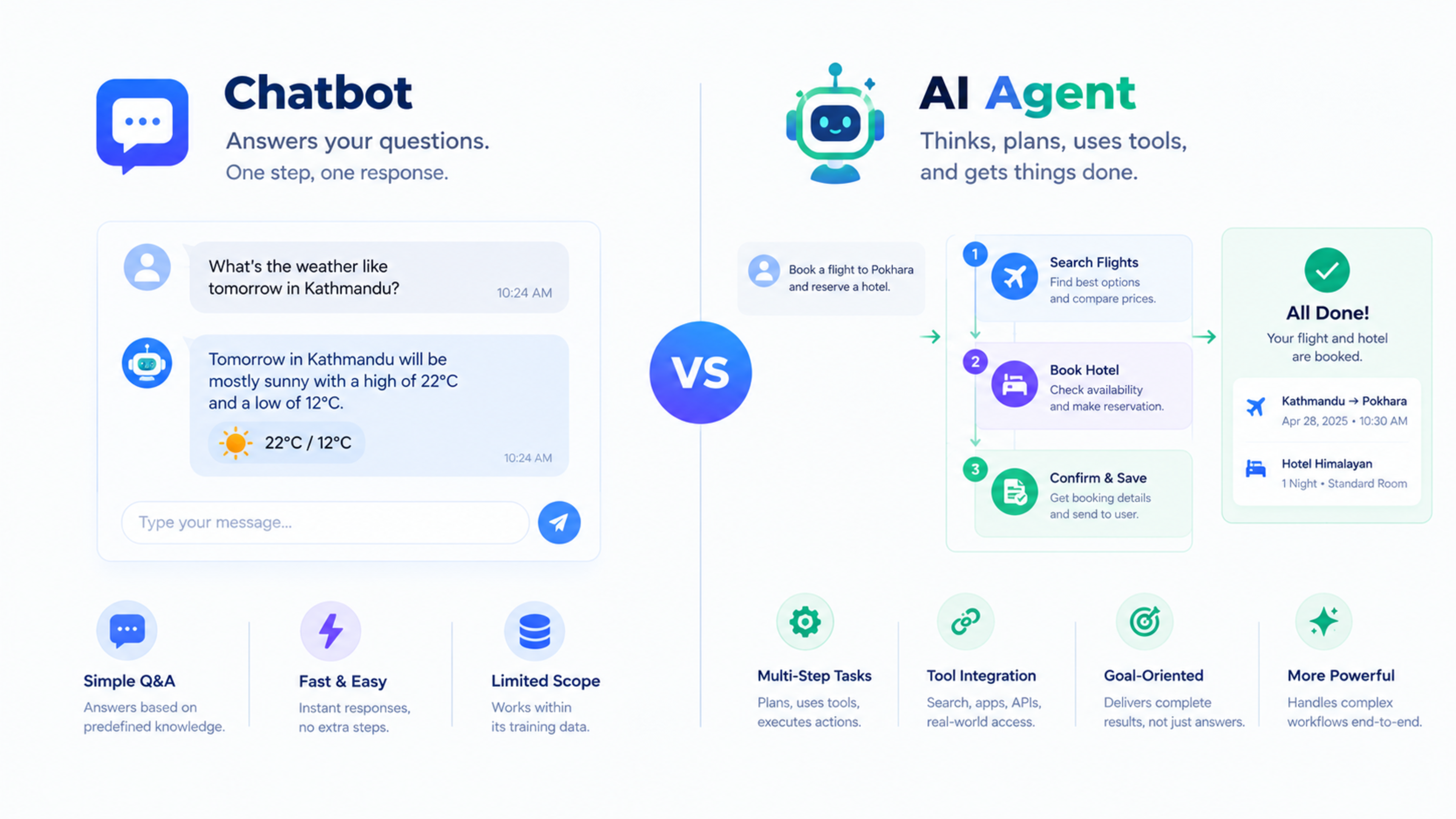
An AI chatbot answers questions. An AI agent completes tasks. That is the simplest difference, but it changes how each one should be used in a business.
A chatbot is useful when customers need quick answers about products, pricing, delivery, booking, or support. An AI agent is useful when a business needs to connect systems, follow a workflow, update records, qualify leads, or complete multi-step tasks with limited human involvement.
This guide explains the difference between AI agents and chatbots, compares their capabilities, and helps you decide which one fits your business.
What is an AI chatbot?
An AI chatbot is a conversational tool that responds to user questions through text or voice. It can answer FAQs, guide visitors, collect basic information, and direct users to the right page or person.
Modern chatbots often use large language models, so they can understand natural language better than older rule-based bots. However, their main role is still conversation.
What a chatbot can do
A website chatbot can:
Answer common questions
Share business hours and contact details
Explain services or products
Collect a visitor’s name, email, and enquiry
Direct users to a pricing page or booking page
Provide basic order or booking information
Escalate complex questions to a human
For example, a restaurant chatbot can answer:
“Do you deliver to Bhaktapur?”
“What time do you close?”
“Can I book a table for four people?”
It can provide information and collect details, but it may still need a human to confirm the booking, check availability, or handle a special request.
What is an AI agent?
An AI agent is a system that can pursue a goal, plan steps, use tools, and complete actions. It does not only respond to a message; it can take action across connected business systems.hp+1
An AI agent may connect to a CRM, calendar, email platform, support desk, database, payment system, or internal API. It can read a request, decide what to do, complete the task, and report the result.
What an AI agent can do
An AI agent can:
Read a new lead enquiry
Check whether the lead already exists in the CRM
Qualify the lead based on rules
Assign it to the right salesperson
Draft a personalised follow-up email
Schedule a follow-up reminder
Update the CRM record
Check order or booking status
Create a support ticket
Escalate only complex cases to a human
Generate a report from business data
For example, when a customer asks, “Where is my order?”, an AI agent can check the order system, identify the delivery status, explain the delay, offer a solution, and create a support ticket if needed.
AI agents vs chatbots: Key differences
Feature | AI chatbot | AI agent |
|---|---|---|
Main purpose | Answer questions | Complete tasks |
Interaction style | Conversation-based | Goal-based and workflow-based |
Human involvement | Often needed for actions | Can act automatically within defined rules |
Tools and integrations | Limited | Connects to CRMs, calendars, email, databases, and APIs |
Decision-making | Basic routing or response selection | Context-aware reasoning and planning |
Best for | FAQs and customer communication | Multi-step business workflows |
Example | “Our delivery charge is NPR 100.” | “Check the customer’s order, explain the delay, and create a support ticket.” |
Risk level | Lower | Higher, because it can take real actions |
Typical setup time | Faster | Longer, because it needs integrations and rules |
A chatbot is usually the better first step. An AI agent becomes valuable when a business wants to automate a complete workflow, not only answer questions.
Example: Chatbot vs AI agent for a restaurant
Chatbot scenario
A customer asks:
“Do you deliver to Lalitpur?”
The chatbot replies:
“Yes, we deliver to selected areas in Lalitpur. Delivery charges depend on your location. Please share your address to check availability.”
The chatbot helps the customer, but a staff member may still need to confirm the order, check the kitchen workload, and arrange delivery.
AI agent scenario
A customer places an order and later asks:
“Where is my order?”
The AI agent can:
Identify the customer and order number.
Check the order status in the restaurant system.
See that the order is being prepared.
Send an update to the customer.
Notify the delivery team when the food is ready.
Escalate the issue if the order is delayed beyond the promised time.
The agent does not merely answer the question. It completes parts of the operational workflow.
Example: Chatbot vs AI agent for lead follow-up
Chatbot scenario
A visitor fills in a contact form asking for a website quote.
The chatbot can:
Thank the visitor
Ask for their email or phone number
Share a link to the pricing page
Notify the sales team
A staff member then reads the enquiry, checks the CRM, prepares a response, and follows up.
AI agent scenario
The AI agent can:
Read the enquiry.
Identify the requested service.
Check whether the lead already exists in the CRM.
Create or update the lead record.
Score the lead based on service interest and urgency.
Assign it to the right salesperson.
Draft a personalised response.
Send the response or request approval.
Create a follow-up task.
Log the activity in the CRM.
The agent removes the repetitive coordination work while keeping humans responsible for pricing, negotiation, and final approval.
When to choose a chatbot
Choose an AI chatbot if your business needs:
Fast answers to common questions
A simple way to capture website enquiries
24/7 basic customer support
Lower-cost automation
A quick improvement in customer experience
A solution that does not require deep system integration
A chatbot is a good fit for small businesses, local service providers, restaurants, clinics, salons, travel agencies, and ecommerce stores that want to reduce repetitive questions.
Good chatbot use cases
Answering business hours and location questions
Explaining services or packages
Collecting contact details
Directing visitors to the right page
Sharing delivery or booking information
Handling basic product questions
Offering support outside office hours
When to choose an AI agent
Choose an AI agent if your business needs:
Lead qualification and automatic CRM updates
Multi-step customer-support workflows
Order status checks and escalation
Appointment scheduling
Invoice or payment follow-up
Internal task assignment
Reporting from multiple systems
Automation across several tools
Reduced manual data entry
An AI agent is especially useful when the same workflow happens repeatedly and requires several systems to work together.
Good AI agent use cases
New lead follow-up
Customer-support ticket triage
Refund or replacement workflows
Appointment reminders
Inventory alerts
Invoice reminders
Sales reporting
Ecommerce order updates
Internal task routing
Document processing
Can you use both?
Yes. Many businesses should use both.
A chatbot can be the front line for customer communication. It can answer common questions and collect initial details. When the request requires an action, it can pass the task to an AI agent.
For example:
A customer asks about a delayed order.
The chatbot collects the order number.
The AI agent checks the order system.
The agent identifies the issue.
The agent sends an update or creates a support ticket.
A human handles only the complex case.
This approach gives customers a fast response while keeping humans in control of sensitive decisions.
Cost comparison
Cost depends on the platform, integrations, complexity, and level of customisation.
Solution | Typical cost pattern | Best for |
|---|---|---|
Basic chatbot | Lower monthly or setup cost | FAQs and simple lead capture |
Custom AI chatbot | Medium setup cost | Brand-specific answers and website integration |
AI agent | Higher setup and integration cost | Multi-step workflows and system automation |
Custom AI automation platform | Highest flexibility | Businesses with unique workflows and multiple tools |
A chatbot usually costs less because it mainly handles conversation. An AI agent costs more because it needs secure integrations, workflow rules, permissions, testing, and monitoring.
Security and permissions
Security becomes more important with AI agents because they can take real actions.
Before connecting an AI agent to business systems, define:
What data the agent can access
Which systems it can update
Which actions require human approval
How customer data is protected
How activity is logged
Who is responsible for errors
How access is revoked if needed
A good rule is to give the agent the minimum access required. For example, an agent may be allowed to read order status and create support tickets, but not delete customer records or issue refunds without approval.
Common mistakes to avoid
Avoid these mistakes:
Using a chatbot for a workflow that needs system actions
Using an AI agent before mapping the business process
Giving the agent access to too many tools
Automating a broken process
Not testing responses with real customer questions
Ignoring human review for sensitive decisions
Failing to monitor performance
Using AI-generated answers without checking accuracy
Connecting customer data without proper privacy controls
How to choose the right option
Ask these questions:
Do customers mostly need answers or completed actions?
Which tasks take the most staff time?
Which systems need to be connected?
Do we need automatic updates in a CRM or order system?
Are there sensitive actions such as refunds or payments?
Do we have clean data and clear workflows?
Do we need human approval before actions are taken?
What is our budget and timeline?
If the answer is mostly “answers,” start with a chatbot. If the answer is “actions across systems,” consider an AI agent.
How Global IT Services can help
Global IT Services helps businesses implement AI chatbots, AI agents, customer-support automation, lead-qualification workflows, CRM integrations, and business process automation.
If you are unsure whether you need a chatbot or an AI agent, start by mapping your most repetitive workflow. The right solution should save time, improve response speed, and reduce manual errors.
Frequently Asked Questions
What is the difference between an AI agent and a chatbot?
A chatbot answers questions through conversation. An AI agent can understand a goal, plan steps, connect to business tools, and complete actions such as updating a CRM, checking an order, or creating a support ticket.
Is a chatbot an AI agent?
A basic chatbot is not necessarily an AI agent. It becomes more agent-like when it can use tools, make decisions, and complete multi-step tasks without constant human direction.
Which is better for customer support: chatbot or AI agent?
A chatbot is better for simple FAQs and first-line support. An AI agent is better when support requires checking orders, updating systems, processing workflows, or escalating issues automatically.
Can a chatbot connect to a CRM?
Yes. Some chatbots can connect to a CRM to capture leads or update basic information. However, an AI agent is usually better for complex CRM workflows involving qualification, assignment, follow-up, and reporting.
Can I use both a chatbot and an AI agent?
Yes. A chatbot can handle initial customer questions, while an AI agent completes tasks such as checking orders, updating records, scheduling follow-ups, or escalating complex issues.
Is an AI agent more expensive than a chatbot?
Usually, yes. AI agents require more integrations, workflow design, permissions, testing, and monitoring. However, they can save more time when they automate multi-step business processes.
Which should a small business start with?
Most small businesses should start with a chatbot for FAQs and lead capture. Once the process is clear, add an AI agent for one high-value workflow such as lead follow-up or customer-support triage.
AI Solutions, Chatbots & Workflow Automation
Empower your business with custom AI agents, automated customer support, and smart pipelines.
Explore this service
Feedback & Discussion
Have questions or insights? Share your thoughts below.